INTRODUCTION
Last Updated: May 18, 2026
At Be-Maps, we believe your personal data belongs to you. Our application is built on a "Privacy by Design" philosophy, meaning we have engineered the Be-Maps app in a way that we (as a first party) are completely cut off from your personal data. We do not run databases or intermediate servers to process, harvest, look at, or track your Be-Maps app information.
Also in this Privacy Policy we describe what other information we may collect when you browse our website, contact us, why we collect it, and how you can update, manage, export, and delete your information.
Be-Maps app: No Data Collection and Zero-Server Architecture
Be-Maps (as the first party) does not collect, store, or transmit your Be-Maps app data to any central server or external third-party company.
- Location and Other Data Sharing: When within your Be-Maps Group, you share your location, media files, etc., this data is transmitted directly from your device to the specific devices of your trusted private group (such as family members, close ones, best friends).
- Transmission Channel: This sharing occurs peer-to-peer (P2P) using your own private, user-controlled communication channel (your private email for your Be-Maps Group).
- No Data Access: We do not own, manage, or have any technical access to the email account or networks used to exchange this data. We cannot see where you are, who you are sharing with, or what data you are sharing.
All your Be-Maps app data (location coordinates, group updates, etc.) is fully encrypted in transit directly within the application before leaving your device. Your data can only be decrypted and read by the specific devices that you have linked within your private Be-Maps Group.
Below we explain what your Be-Maps Group is and how your Be-Maps Data is shared within your private Be-Maps Group.
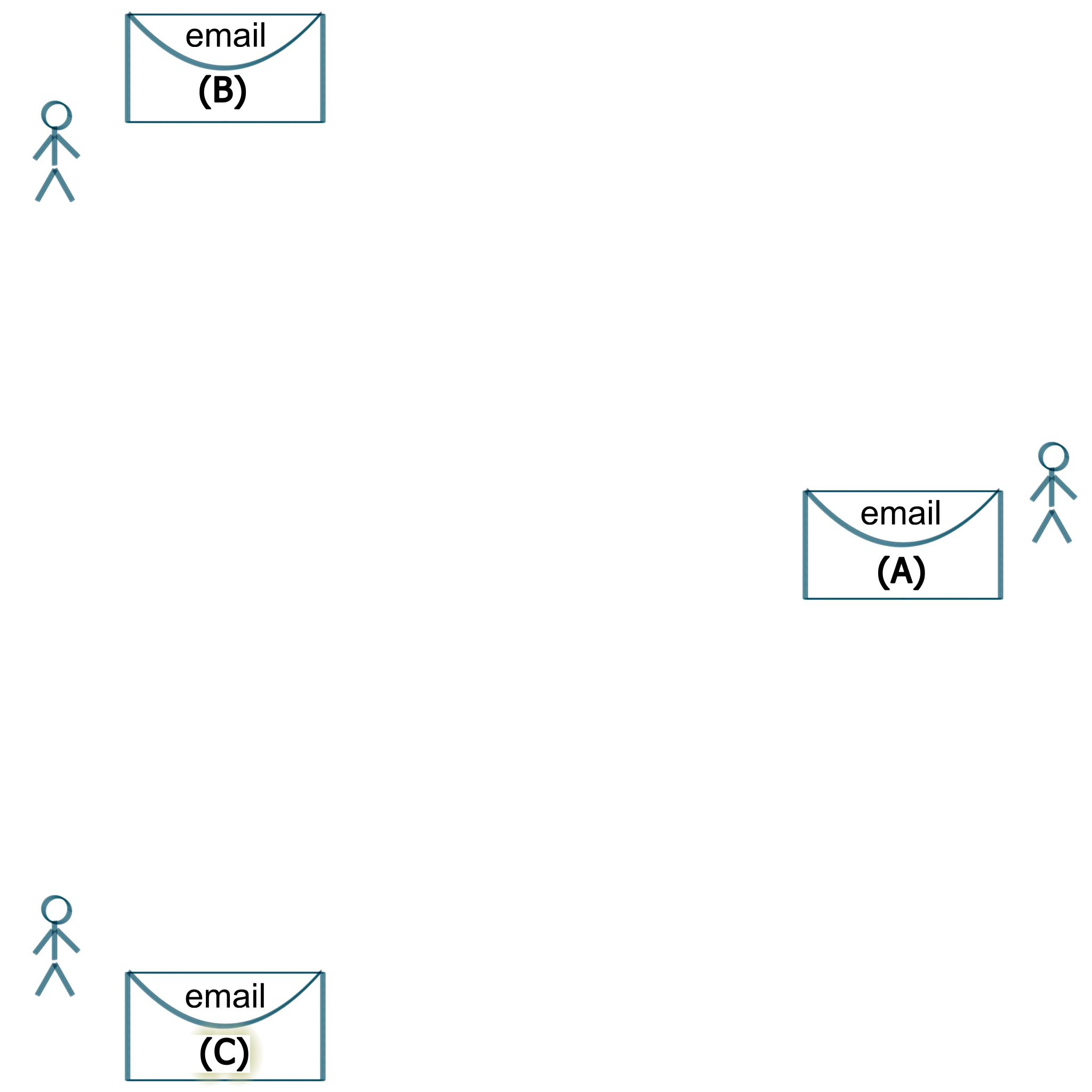
What Is Be-Maps Group
In the below five steps we describe how your Be-Maps Group is created and how it works.
You have seperate people with separate devices not connected by Be-Maps app. They have their own private emails (which Be-Maps app does not use).
To avail of Be-Maps app you need:
- iOS and / or Android compatible devices
- ONE New / Separate private email dedicated only for your Be-Maps Group
- This NEW single email will be used for your Be-Maps Group data exchange
- Install Be-Maps on the devices of your group
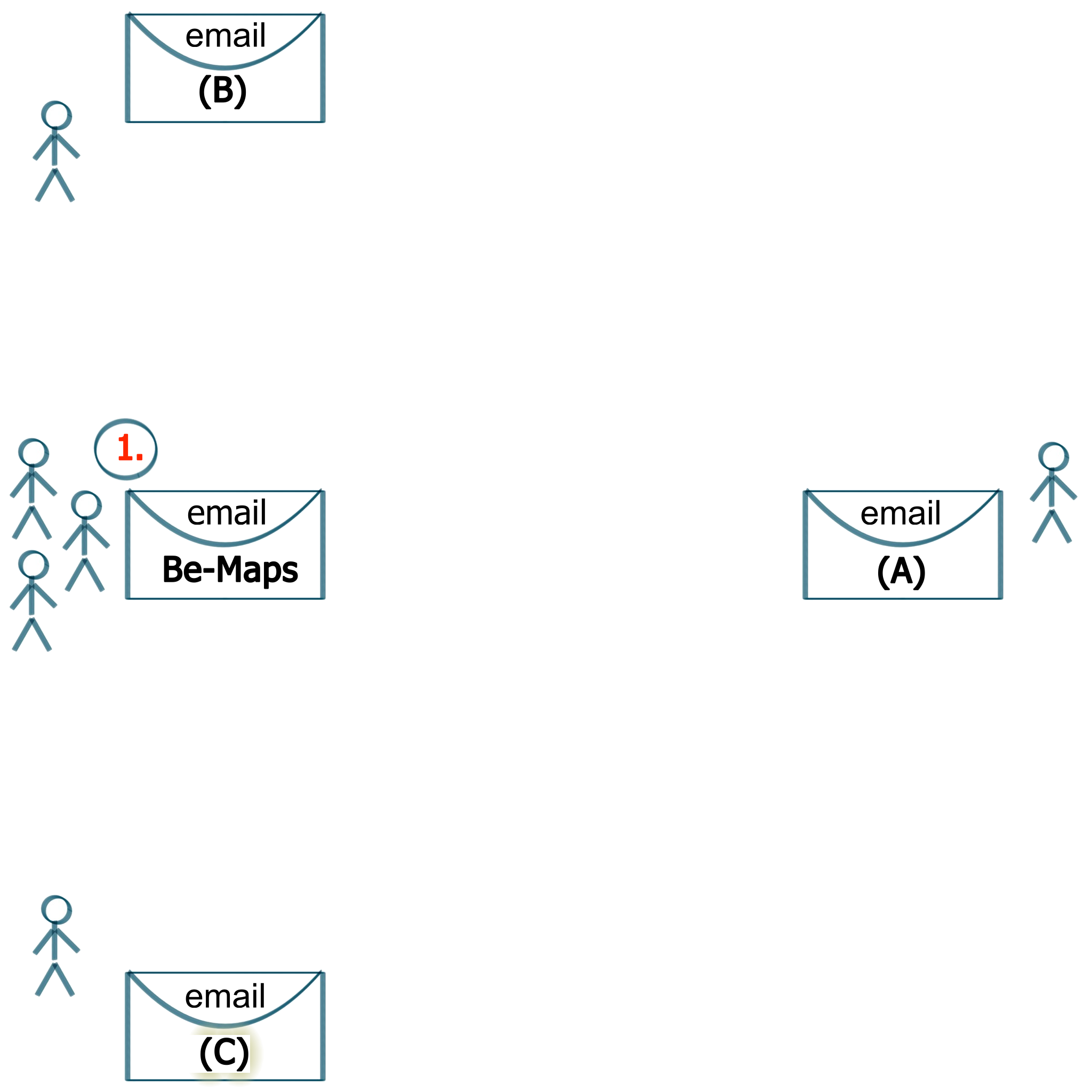
1. Your Group Email
Create Your Group Private Email account for your Be-Maps Group.
- Data transferred in your Be-Maps Group will be exchanged via this email
- Only devices from your Be-Maps Group will use this email
- Most of email providers with SMTP and IMAP (SSL/TLS) shuold work
- Please check our website for tested list of email providers
- Be-Maps does NOT support OAuth (for example: gmail, AOL)
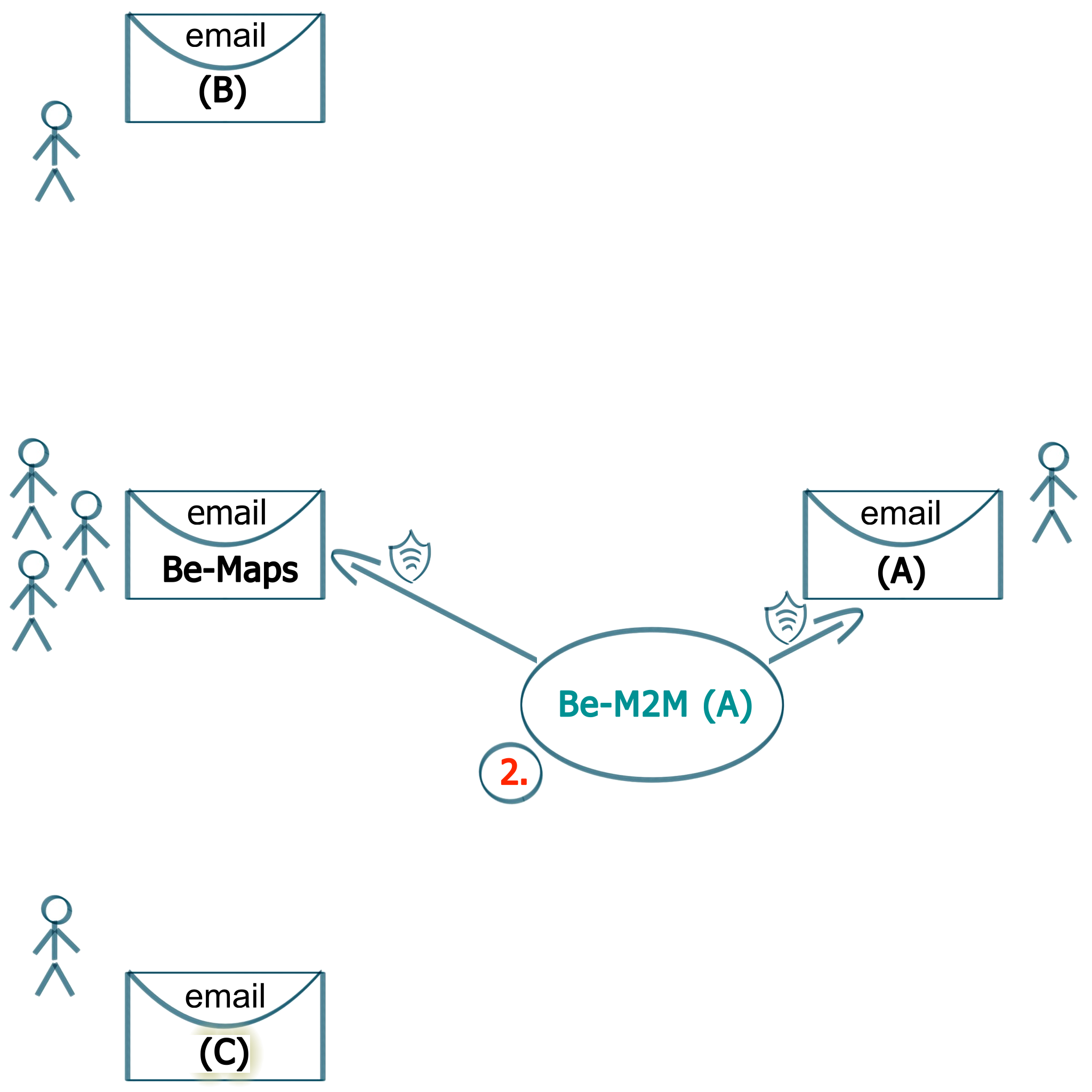
2. Be-Maps Certificate
During first configuration your Be-Maps app will create random Certificate part for your group.
Be-Maps app is using Be-M2M function to instll this certificate on your Be-Maps email.
DO NOT schare this certificate outside of your group.
This certificate is partially used to:
- generate encryption keys
- transfer and encrypt data between your devices
- connect your Be-Maps Group devices via this one email
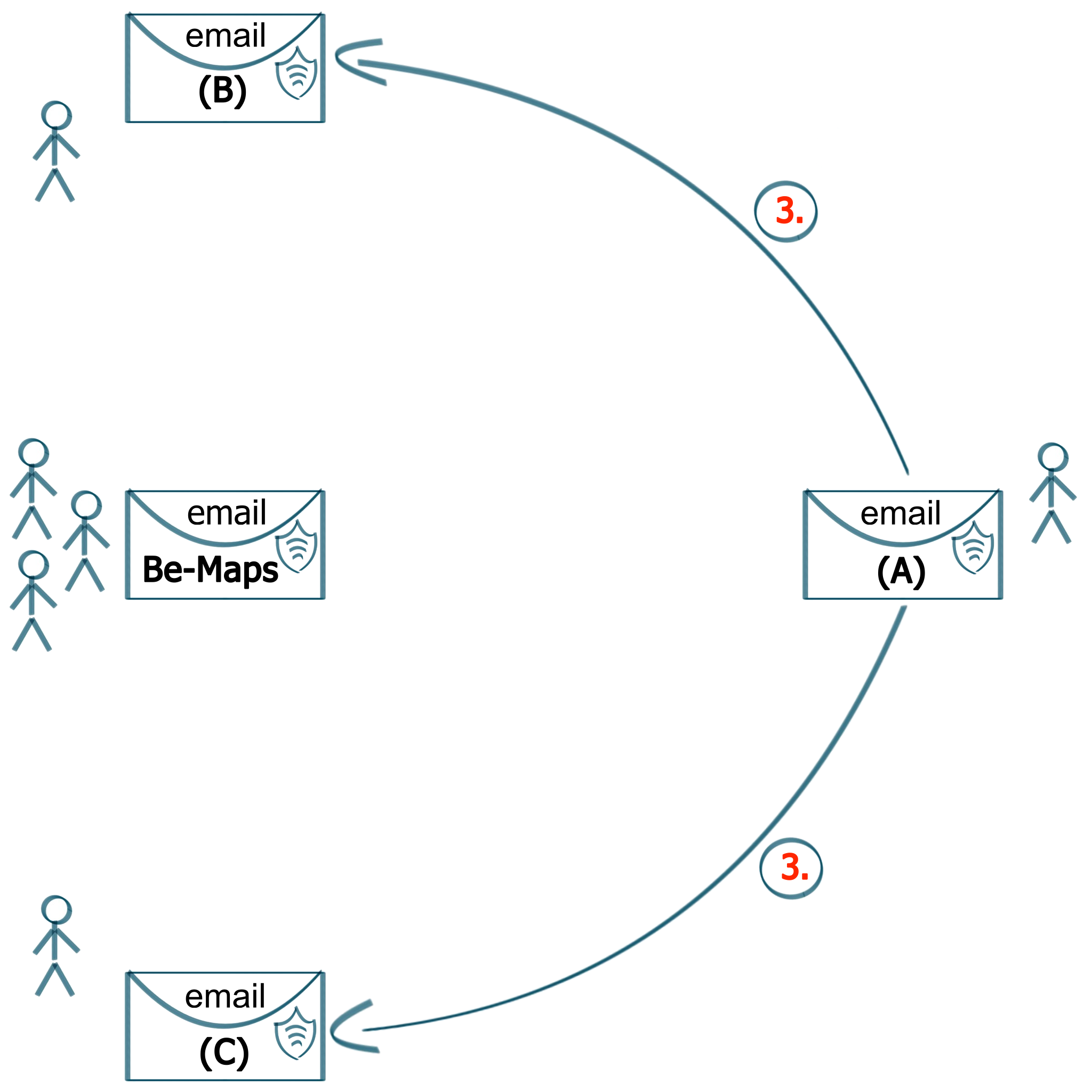
3. Share Be-Maps credentials to your group
Use the same email credentials for your Be-Maps Group:
- share it in secure way
- do not share these to anyone else
- use it during Be-Maps configuration on your group devices
- current technology allows to connect upto 7 devices in one group
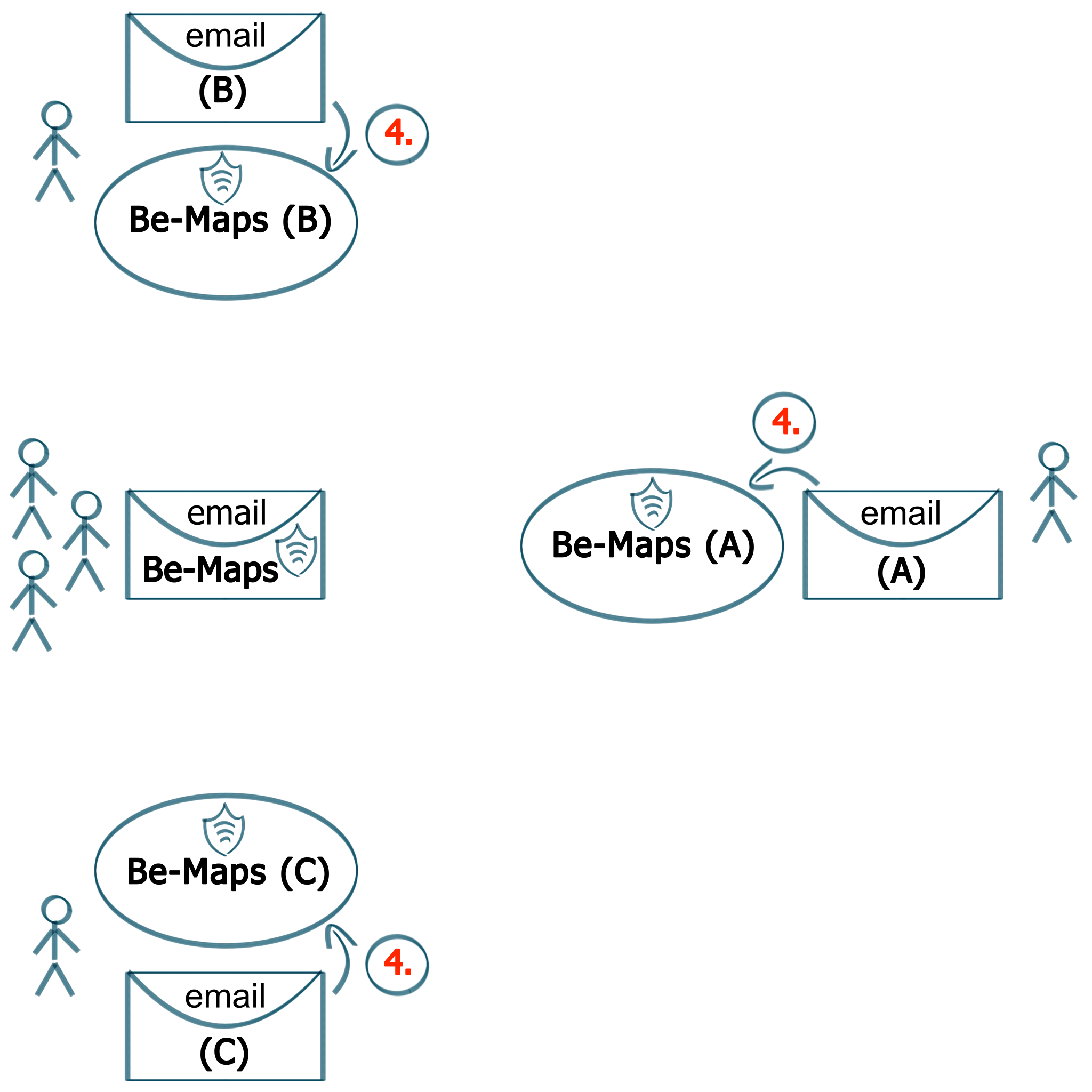
4. Install Be-Maps
Install Be-Maps on the devices of your group.
You will need to:
- allow all requested permissions
- copy/paste the Be-Maps Group email, and
- enter the password for this email
- setup data sharing
See our "How To" YouTube videos for details
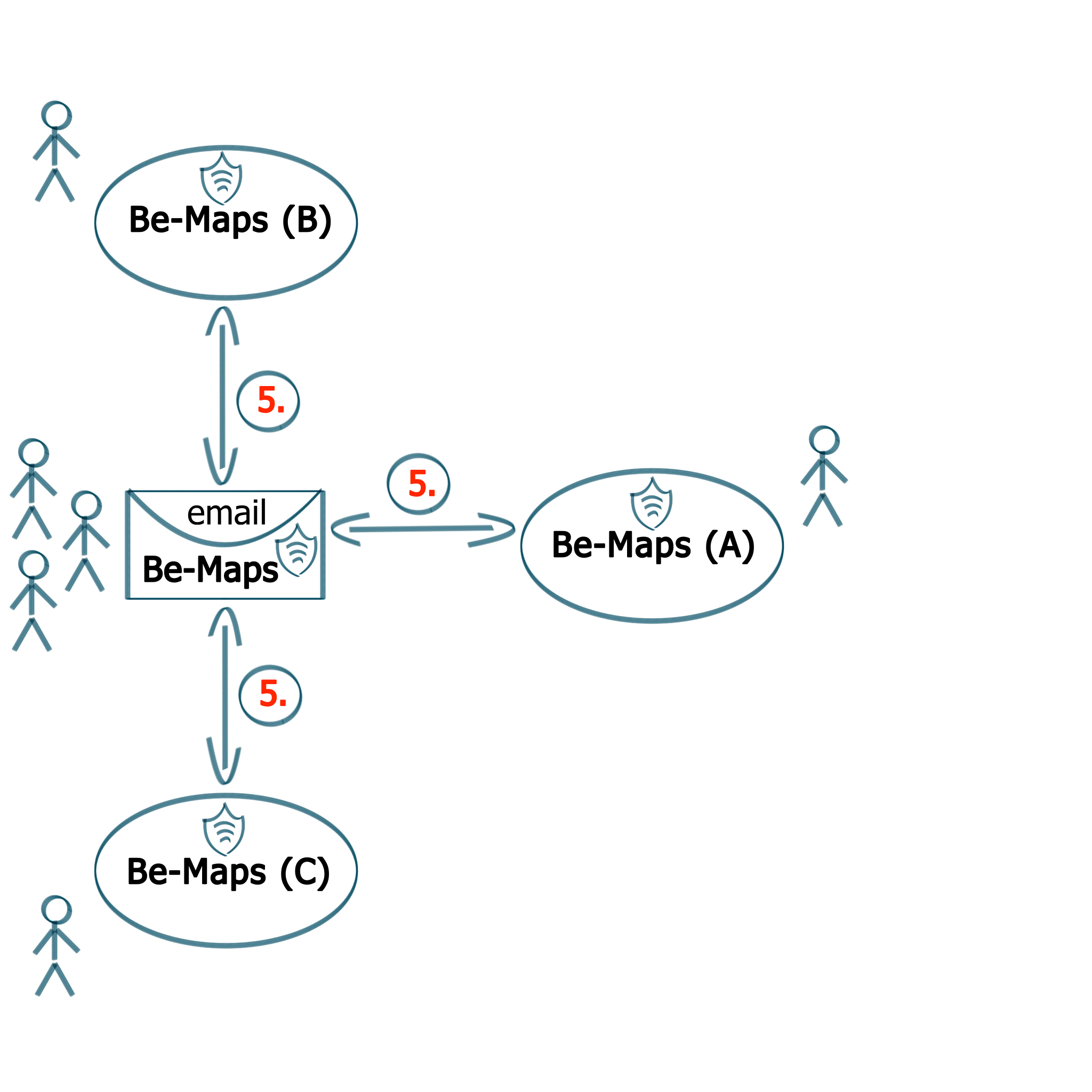
5. Your Private Be-Maps Group
Now your Be-Maps Group is connected via your single Be-Maps email.
Your Be-Maps data:
- is stored and processed only on the devices of your group, and
- transferred via your private Be-Maps email
- is stored and processed encrypted, each time with a different key
NOTE: WE DO NOT STORE NOR PROCESS ANY OF YOUR Be-Maps app data, all the data stays on your group's email (in-transit) and devices
Privacy Policy Details
As per our current knowledge below are the types of information collected in relation to our applications and services.
Please note we also describe how your devices share Be-Maps data between each other - without us as a first party having access to it.
Once we have your data, we as a first party do not send any of your data to our third parties.
Please Note: We may need to share your data for legal purposes.
When you use Be-Maps Application:
- We as a first party and our third parties do not have access to Be-Maps data.
- All your Be-Maps data stays only within your Be-Maps Group.
- Your Be-Maps data is shared between your Be-Maps Group devices via your private Be-Maps email.
- Your Be-Maps data is stored on your Be-Maps Group devices and your Be-Maps email (in-transit).
- Be-Maps data includes: named users, gps location with geo-fencing, device usage information, timestamp, automated recordings, automated photos, automated videos, text and audio and video messages).
- How long our application stores data depends on your Be-Maps settings.
- We do not have access to your Be-Maps Group Devices or your Be-Maps Group email.
- Your telecommunication operators might keep trace of your data interactions for their legal requirements.
- Your online application store keeps your data according to their Privacy Policy.
- In transfer Be-Maps data is encrypted (for each transfer we generate a separate key).
Be-Maps app: Permissions and Their Use
To provide core mapping and group synchronization features, Be-Maps app requests specific system permissions. These features operate "while-in-use" and "background-location" on your device:
- Location (Precise/Coarse/in-background): Used exclusively to determine your position so it can be shared with your private group.
- Camera / Microphone (Foreground Service): Used only when actively started/triggered by you for group alerts, streaming, or features within your private Be-Maps Group.
- Boot Completion: Used to safely restart your local group alert configurations when your device powers on.
- Your Activities (driving, walk, step count, speed, etc.): Used to increase the amount of information which might help with your safety
Be-Maps app: Third-Party Services
- Google Maps API: Be-Maps uses the official Google Maps SDK to render map visuals and tiles. Google handles transit infrastructure requests securely and anonymously. It does not share your app-specific data with third parties for profiling or advertising..
- No Advertisements: Be-Maps does not feature third-party advertising networks (like Google AdMob). Therefore, your location and usage behavior are never shared with or monetized by ad brokers.
When you browse our website:
- We as a first party and our third parties use and store only nesessary browsing statistics and related cookies.
- We as a first party and our third parties collect nesessary information which page was browsed for our app interest & website statistics purposes (these include, IP address, date, time, browser type, device type, operating system, country).
- Your telecommunication operators might keep track of your interactions for their legal requirements.
When you contact us via email or phone:
- We as a first party may keep your data for communication and support purposes.
- Our email or phone operators keeps track of your interactions based on legal requirements.
- Your telecommunication operators might keep track of your interactions for their legal requirements.
To communicate with you - We use information we collect, like your email address, to interact with you directly.
Managing, reviewing, and updating your information
- In case if you want to update or delete your data of have questions about it please contact us by email: support@be-maps.com
- Your In app data can be deleted on other devices by sending a delete request (from settings screen), or by deleting applications within your group.
How do we share your information
- We do not share your information we collected as a first party unless legally required.
- Your Group Be-Maps applications share Be-Maps Data directly via your Be-Maps Email. This type of data exchange does not involve us as a first party.
Your consent
- In Be-Maps you choose the way you want to share your data within your Be-Maps Group (please see our videos to understand how our applications work).
- When you use/install our products/services you consent to this Privacy Policy and your data processing.
- If you do not agree please uninstall and do not use our products or services.
- In case we need to share your data other than above we’ll ask for your explicit consent to share it.
External processing
- We as a first party do give your data for external processing
- Please Note: Your data are processed as per above.
Legal requirements
Please note: we must share information we collected as a first party for legal reasons:
- In order to comply to any applicable law, and regulations.
- Enforce applicable Terms of Use, including investigation of potential violations.
- Detect, prevent, or otherwise address fraud, security, or technical issues.
- Protect against harm to the rights, property or safety of our users or the public.
To Protect your information
- We use encryption to keep your data private while in transit.
- Be-Maps has rules and privileges build into it, to share within your Be-Maps Group only the data you allow.
Examples of Be-Maps processing activities (as a first party we are not involved in this data flow):
- You share your location so that others from your Be-Maps Group can find you on a map, or to know if your child is in designated zone, or if your child did not go too far away from you.
- Recordings, photos and location are shared in your Be-Maps Group based on you triggering alert and are used to help you by other members of your group.
- You can also use your phone to remotely monitor your property: sound and video recording, photos.
- Within your Be-Maps Group you can share your messages (text, voice, video).
- On your Be-Maps App you can create your own voice or video notes, not shared in your Be-Maps Group.
Please NOTE: you are responsible for legal use of Be-Maps features.
Examples of our website processing activities:
- We use your data for our website statistics and engagement, for example we check IP ranges to see visits on our website per individual country.
- We do not use cookies, but google analitics embedded in our website does (for browsing engagement purposes).
Update, Manage and Export your data
- Please send us an email and we will update or send you copy of your data stored by us as a first party.
- Be-Maps data are already on your device and can be viewed and managed by you in the Be-Maps Application.
This Privacy Policy applies to all of our products and services and is part of our Terms of Use.
DATA PROCESSING AND DATA COLLECTION
Be-Maps Application:
- As a First Party WE DO NOT STORE NOR PROCESS ANY OF YOUR Be-Maps data : all of your data stays on your Be-Maps Group's email and devices.
- As a First Party WE DO NOT SEND your data to our third party.
- Your Be-Maps data is stored and processed only on the devices of your group and your private Be-Maps email (as a First Party we do not have access to your email).
- Your Be-Maps data is transferred encrypted (between the devices of your group), each time with a different key
We consider the data transferred between your Be-Maps Group devices via your email used for Be-Maps App data exchange as User-initiated action or prominent disclosure and user consent (as not processed and/or not transferred by us). Transferring Be-Maps App data via other third party (meaning via your private Be-Maps email account, to your Be-Maps Group devices) based on a user-initiated action and consent, where the user reasonably expects the data to be shared, based on a prominent in-app disclosure and consent meets the requirements of User-initiated action or prominent disclosure and user consent. Transferring Be-Maps App data via your private Be-Maps Group email (your third party) based on a specific user-initiated action, where the user reasonably expects the data to be shared (without us being able to access it), based on a prominent in-app disclosure and consent meets the requirements described above as not processed and not stored by us as a First Party or by our Third Party.
DATA DELETION
Your Be-Maps App stores Be-Maps Data on the devices within you private Be-Maps Group.
That data can be deleted from the Be-Maps Application (we do not have access to your Be-Maps data / email / devices). To delete data of any of the users from any of your Be-Maps Group connected devices you have to follow the below steps in Be-Maps App:
- Make sure you have mobile data connection
- Go to: Manager -> Setup (icon) -> Settings
- Select switch: Devices
- Select checkbox: Only Data
- From drop-dowm choose which device data you want to be deleted
- Tap: Delete Data
This will send a DELETE request to all of the devices connected to your group.
NOTE: All the devices must have Be-Maps started on them and connect to internet after that moment (this request is queued). The data will be deleted only when devices are connected to the charger (each time any of the devices connects to power - the data for the requested delete device will be removed - this delete request will be actioned for one week from the time of receiving the request from the queue). If in that week one of the devices will not connect to power and will not have Be-Maps working on the device the data will not be deleted (please make sure this is not the case).
Please note: To quickly delete Be-Maps data locally on your phone you may delete our App. Deleting the App on your phone will only delete the data locally. In that scenario your data will still be present on the other devices in your group, and will be deleted according to the data retention schedule set on the other phones. Also if needed the proper delete data request can be triggered from any other devices from your group for any of the registered devices.
To check if the Data Delete Request was prolerly distributed go to:
- Manager
- On top choose tab: Requests
- After around two minutes the Data Delete Request should appear on the list there
When you need help to delete these please email us on:
Support@Be-Maps.Com
ACCOUNT DELETION
Your Be-Maps App creates your Account (Account Registration) only on your Private Be-Maps Group Email. On our end we (as the First Party) do not create any account for it.
Please Note: You have to delete your Account Registration from your device when you want to change your device and keep the same device name. Once this account delete is done your local data is also deleted.
In a scenario when you deleted your Be-Maps App your Be-Maps Account can be deleted by anyone from your Be-Maps Group via the Be-Maps Application (and if needed, make sure to delete data first, to do that follow the steps in paragraph above). We do not have access to your Be-Maps data or account, and it has to be deleted from your group devices.
To delete this Account you have to follow the below steps in Be-Maps App:
- Make sure you have mobile data connection
- Go to: Manager -> Setup (icon) -> Settings
- Select switch: Devices
- Empty checkbox: Only Data (it must be NOT Checked)
- From drop-dowm choose which device Account Registration you want to delete
- Tap: Delete Registration
This will DELETE the selected device Account Registration. When on your device you choose to delete your own account registration all of your local Be-Maps setup and data will be cleared.
If needed the delete account registration request can be triggered from any other devices from your Be-Maps Group for any of the devices, but if that Be-Maps device is still active it will re-register.
When you do not have access to a device and if you need to exclude it from your Be-Maps Group follow the below steps:
- First if needed send the delete data request for the device-data you want to be cleared (note this data will be removed from all of the devices)
- Login to your Be-Maps email provider and change the password
- Do not update email password on the excluded device
- Update the password on each Be-Maps Device you want to keep (Manager -> Setup (icon) -> Settings -> Email -> update the password -> Save Settings)
- If needed Delete Data of the excluded device
- Delete Registration of the excluded device
DELETE DATA AND DEVICE ACCOUNT FROM BE-MAPS GROUP
Your Be-Maps App:
- creates your Account Registration on your Private Be-Maps Group Email (which is used for Be-Maps data transfer)
- and stores Be-Maps Data on the devices within this group.
When you want to remove one of the devices from your Be-Maps Group follow the below steps:
- First delete that device data as described above, you may skip this step if you allow others to keep your data
- Next delete its Account (described above)
- Now you may configure this Be-Mapsaps with a different group, or if you with you may remove/uninstall Be-Maps App on that device.
This way you will delete Data and Account Registration for that device. If needed the request to delete the device data or the account registration can be triggered on any other devices from your Be-Maps Group for any of the devices.
Please note, when the delete registration was not triggered on the data owner device that device will still be active and will automatically re-register if Be-Maps App is still working there.
DATA ENCRYPTION COMPLIANCE (BIS / NSA)
Applications Be-Maps uses following publicly available open source libraries to send / receive / manage data via email:
- https://github.com/MailCore/mailcore2 for iOS
- https://github.com/jakartaee/mail-api for Android
EMAIL TRANSMISSION IN Be-Maps is SSL/TLS, BASED ON FOLLOWING CONFIGURATION CODE.
IMAP (iOS)
if let session = await IMAPSession.get() {//MCOIMAPSession()
if await IMAPSession.isSessionNew() {
if (config.getIMAPSSL().equals("SSL")){
session.hostname = config.getIMAPServer()
session.username = config.getUserName()
session.password = config.getPassword()
session.port = UInt32.parseUInt32(config.getIMAPport())
session.allowsFolderConcurrentAccessEnabled = true
session.connectionType = MCOConnectionType.TLS
session.authType = MCOAuthType.saslLogin
session.isCheckCertificateEnabled = false
session.isVoIPEnabled = false
session.maximumConnections = 2
session.timeout = App.connectionTimeout
} else { // TLS
session.hostname = config.getIMAPServer()
session.username = config.getUserName()
session.password = config.getPassword()
session.port = UInt32.parseUInt32(config.getIMAPport())
session.allowsFolderConcurrentAccessEnabled = true
session.connectionType = MCOConnectionType.startTLS
session.authType = MCOAuthType.saslPlain
session.isCheckCertificateEnabled = false
session.isVoIPEnabled = false
session.maximumConnections = 2
session.timeout = App.connectionTimeout
} } }
IMAP (Android)
//Creating properties
Properties properties = new Properties();
MailSSLSocketFactory socketFactory = new MailSSLSocketFactory();
if (config.getIMAPSSL().equals("SSL")) {
properties.put("mail.imap.host", config.getIMAPServer());
properties.put("mail.imap.port", config.getIMAPport());
properties.setProperty("mail.imap.socketFactory.class", "javax.net.ssl.SSLSocketFactory");
properties.setProperty("mail.imap.socketFactory.fallback", "true");
properties.setProperty("mail.imap.socketFactory.port", config.getIMAPport());
} else { // TLS
socketFactory.setTrustAllHosts(true);
properties.setProperty("mail.imap.host", config.getIMAPServer());
properties.setProperty("mail.imap.user", config.getUserName());
properties.setProperty("mail.imap.password", config.getPassword());
properties.setProperty("mail.imap.port", config.getIMAPport());
properties.setProperty("mail.imap.auth", "true");
properties.setProperty("mail.imap.starttls.enable", "true");
properties.put("mail.imap.starttls.enable", "true");
properties.put("mail.imap.ssl.socketFactory", socketFactory);
}
properties.put("mail.imap.connectiontimeout",App.constConnectionTimeout);
properties.put("mail.imap.timeout", App.constSocketReadTimeout);
properties.put("mail.imap.writetimeout", App.constSocketWriteTimeout);
Session session = Session.getInstance(properties);
SMTP (iOS)
let session = MCOSMTPSession()
//Creating connection properties
if (config.getSMTPSSL().equals("SSL")) {
session.hostname = config.getSMTPServer()
session.username = config.getUserName()
session.password = config.getPassword()
session.port = UInt32.parseUInt32(config.getSMTPport())
session.isCheckCertificateEnabled = false
session.authType = MCOAuthType.saslLogin//.saslPlain
session.connectionType = MCOConnectionType.TLS
session.timeout = App.connectionTimeout
} else { // TLS
session.hostname = config.getSMTPServer()
session.username = config.getUserName()
session.password = config.getPassword()
session.port = UInt32.parseUInt32(config.getSMTPport())
session.isCheckCertificateEnabled = false
session.authType = MCOAuthType.saslLogin//.saslPlain
session.connectionType = MCOConnectionType.TLS
session.timeout = App.connectionTimeout
}
SMTP (Android)
//Creating connection properties
Properties props = new Properties();
MailSSLSocketFactory socketFactory = new MailSSLSocketFactory();
if (config.getSMTPSSL().equals("SSL")) {
props.put("mail.smtp.host", config.getSMTPServer());
props.put("mail.smtp.ssl.enable", "true");
props.put("mail.smtp.auth", "true");
props.put("mail.smtp.port", config.getSMTPport());
} else { // TLS
socketFactory.setTrustAllHosts(true);
props.put("mail.smtp.host", config.getSMTPServer());
props.put("mail.smtp.socketFactory.port", config.getSMTPport());
props.put("mail.smtp.socketFactory.class", "javax.net.ssl.SSLSocketFactory");
props.put("mail.smtp.auth", "true");
props.put("mail.smtp.port", config.getSMTPport());
props.put("mail.smtp.starttls.enable", "true");
props.put("mail.smtp.ssl.socketFactory", socketFactory);
}
props.put("mail.smtp.connectiontimeout",App.constConnectionTimeout);
props.put("mail.smtp.timeout", App.constSocketReadTimeout);
props.put("mail.smtp.writetimeout", App.constSocketWriteTimeout);
//Authenticating with password
Session session = Session.getInstance(props,
new javax.mail.Authenticator() {
//Authenticating the password
protected PasswordAuthentication getPasswordAuthentication() {
return new PasswordAuthentication(config.getUserName(), config.getPassword());
}});
Data transmitted between Be-Maps Applications use symmetric 128bit AES encryption algorithm.
Be-Maps application uses following publicly available open source libraries to encrypt transmitted data.
- https://github.com/krzyzanowskim/CryptoSwift for iOS
- https://developer.android.com/reference/kotlin/javax/crypto/package-summary for Android
TEXT ENCRYPTION IN Be-Maps IS BASED ON THE FOLLOWING CODE.
iOS encryption
public static func EncryptStringBaseKey ( _ mDecryptedData:String, _ mBaseKey:String ) -> String {
// put data in Byte Arrays
let mData:Array(UInt8) = Array(mDecryptedData.utf8)
let key:Array(UInt8) = Array(mBaseKey.utf8)
let iv:Array(UInt8) = AES.randomIV(GCM_IV_LENGTH) //(AES.blockSize)
do {
// In combined mode, the authentication tag is directly appended to the encrypted message.
let gcm = GCM(iv: iv, mode: .combined)
let aes = try AES(key: key, blockMode: gcm, padding: .noPadding)
let encrypted = try aes.encrypt(mData)
//let tag = gcm.authenticationTag
var encryptedData:Data = Data()
encryptedData.append(iv, count: iv.count)
encryptedData.append(encrypted, count: encrypted.count)
let encryptedBase64 = encryptedData.base64EncodedString(options: Data.Base64EncodingOptions.lineLength76Characters)
return encryptedBase64
} catch {
logd("EncryptStringBaseKey - error")
}
return ""
}
iOS decryption
public static func DecryptStringBaseKey ( _ mEncryptedData:String, _ mBaseKey:String ) -> String {
// decode Base64 to Data
let mAllData = Data(base64Encoded: mEncryptedData, options: NSData.Base64DecodingOptions.ignoreUnknownCharacters)
//let mAllData = mEncryptedData.data(using: .utf8, allowLossyConversion: true)
if (mAllData == nil) {return ""}
// extract iv and put to Byte Array
let ivData = mAllData!.subdata(in: 0.. till GCM_IV_LENGTH)
let iv:Array(UInt8) = ivData.bytes
// extract encryptead data and add to Byte Array
let mDataData = mAllData!.subdata(in: GCM_IV_LENGTH..till mAllData!.count)
let mData:Array(UInt8) = mDataData.bytes
let key:Array(UInt8) = Array(mBaseKey.utf8)
do {
// In combined mode, the authentication tag is appended to the encrypted message. This is usually what you want.
let gcm = GCM(iv: iv, mode: .combined);
let aes = try AES(key: key, blockMode: gcm, padding: .noPadding)
let decr = try aes.decrypt(mData)
let decryptedString:String = String(decoding: decr, as: UTF8.self)
return decryptedString
} catch {
logd("DecryptStringBaseKey - error: \(error)")
}
return ""
}
Android encryption
public static String EncryptStringBaseKey(String mDecryptedData, String mBaseKey) throws Exception {
SecureRandom secureRandom = new SecureRandom();
SecretKey secretKey = new SecretKeySpec(mBaseKey.getBytes(StandardCharsets.UTF_8), "AES");
byte[] iv = new byte[GCM_IV_LENGTH];
secureRandom.nextBytes(iv);
final Cipher cipher = Cipher.getInstance("AES/GCM/NoPadding");
GCMParameterSpec parameterSpec = new GCMParameterSpec(KEY_LENGTH, iv);
cipher.init(Cipher.ENCRYPT_MODE, secretKey, parameterSpec);
byte[] cipherText = cipher.doFinal(mDecryptedData.getBytes(StandardCharsets.UTF_8));
ByteBuffer byteBuffer = ByteBuffer.allocate(iv.length + cipherText.length);
byteBuffer.put(iv);
byteBuffer.put(cipherText);
Arrays.fill(iv,(byte) 0);
String encryptedString = Base64.encodeToString(byteBuffer.array(), Base64.NO_WRAP);
return encryptedString;
}
Android decryption
public static String DecryptStringBaseKey(String mEncryptedData, String mBaseKey) throws Exception {
SecretKey secretKey = new SecretKeySpec(mBaseKey.getBytes(StandardCharsets.UTF_8), "AES");
final Cipher cipher = Cipher.getInstance("AES/GCM/NoPadding");
byte [] cipherMessage = Base64.decode(mEncryptedData, Base64.DEFAULT);
AlgorithmParameterSpec gcmIv = new GCMParameterSpec(KEY_LENGTH, cipherMessage, 0, GCM_IV_LENGTH);
cipher.init(Cipher.DECRYPT_MODE, secretKey, gcmIv);
return new String(cipher.doFinal(cipherMessage, GCM_IV_LENGTH, cipherMessage.length - GCM_IV_LENGTH),StandardCharsets.UTF_8);
}
FILE ENCRYPTION IN Be-Maps IS BASED ON THE FOLLOWING CODE.
iOS encryption
public static func EncryptFileBaseKey( _ inDecryptedFileName:String , _ mBaseKey:String ) -> String {
let mDecryptedFileName = App.getCurrentAppPath() + inDecryptedFileName
let outEncryptedFileName = inDecryptedFileName + ".encrypted"
let encryptedFileName = mDecryptedFileName + ".encrypted"
let key:Array(UInt8) = Array(mBaseKey.utf8)
let iv:Array(UInt8) = Array(mBaseKey.substring(0,GCM_IV_LENGTH).utf8)
do {
// write until all is written
let gcm = GCM(iv: iv, mode: .combined)
let aes = try AES(key: key, blockMode: gcm, padding: .noPadding)
var encryptor = try aes.makeEncryptor()
// prepare streams
let inputStream = InputStream(fileAtPath: mDecryptedFileName)
let outputStream = OutputStream(toFileAtPath: encryptedFileName, append: false)
inputStream?.open()
outputStream?.open()
var buffer = Array(UInt8)(repeating: 0, count: BUFFOR_LENGTH)
// encrypt input stream data and write encrypted result to output stream
while (inputStream?.hasBytesAvailable)! {
let readCount = inputStream?.read(buffer, maxLength: buffer.count)
if (readCount! > 0) {
try encryptor.update(withBytes: buffer[0..till readCount!]) { (bytes) in
writeTo(stream: outputStream!, bytes: bytes)
}
}
}
try encryptor.finish { (bytes) in // finalize encryption
writeTo(stream: outputStream!, bytes: bytes)
}
/*if let ciphertext = outputStream?.property(forKey: Stream.PropertyKey(rawValue:Stream.PropertyKey.dataWrittenToMemoryStreamKey.rawValue)) as? Data {
logd("Encrypted stream data: \(ciphertext.toHexString())")
}*/
//out.flush();
outputStream?.close()
inputStream?.close()
} catch { logd("Encryption error \(error)")}
return outEncryptedFileName;
}
iOS decryption
public static func DecryptFileBaseKey( _ inEncryptedFileName:String, _ mBaseKey:String ) -> String {
let mEncryptedFileName = App.getCurrentAppPath() + inEncryptedFileName
let outDecryptedFileName = inEncryptedFileName.replaceAll(".encrypted","")
let mDecryptedFileName = mEncryptedFileName.replaceAll(".encrypted","")
let key:Array(UInt8) = Array(mBaseKey.utf8)
let iv:Array(UInt8) = Array(mBaseKey.substring(0,GCM_IV_LENGTH).utf8)
do {
// write until all is written
let gcm = GCM(iv: iv, mode: .combined)
let aes = try AES(key: key, blockMode: gcm, padding: .noPadding)
var encryptor = try aes.makeDecryptor()
// prepare streams
let inputStream = InputStream(fileAtPath: mEncryptedFileName)
let outputStream = OutputStream(toFileAtPath: mDecryptedFileName, append: false)
inputStream?.open()
outputStream?.open()
var buffer = Array(UInt8)(repeating: 0, count: BUFFOR_LENGTH)
// encrypt input stream data and write encrypted result to output stream
while (inputStream?.hasBytesAvailable)! {
let readCount = inputStream?.read(buffer, maxLength: buffer.count)
if (readCount! > 0) {
try encryptor.update(withBytes: buffer[0..till readCount!]) { (bytes) in
writeTo(stream: outputStream!, bytes: bytes)
}
}
}
try encryptor.finish { (bytes) in // finalize encryption
writeTo(stream: outputStream!, bytes: bytes)
}
/*if let ciphertext = outputStream?.property(forKey: Stream.PropertyKey(rawValue:Stream.PropertyKey.dataWrittenToMemoryStreamKey.rawValue)) as? Data {
logd("Encrypted stream data: \(ciphertext.toHexString())")
}*/
//out.flush();
outputStream?.close()
inputStream?.close()
} catch { logd("Encryption error \(error)")}
return outDecryptedFileName;
}
Android encryption
public static String EncryptFileBaseKey(String mDecryptedFileName, String mBaseKey) throws Exception {
FileInputStream fis = new FileInputStream(mDecryptedFileName);
SecretKey secretKey = new SecretKeySpec(mBaseKey.getBytes(), "AES");
byte[] iv = mBaseKey.substring(0,GCM_IV_LENGTH).getBytes();
final Cipher cipher = Cipher.getInstance("AES/GCM/NoPadding");
GCMParameterSpec parameterSpec = new GCMParameterSpec(KEY_LENGTH, iv);
cipher.init(Cipher.ENCRYPT_MODE, secretKey, parameterSpec);
String encryptedFileName = mDecryptedFileName + ".encrypted";
FileOutputStream fos = new FileOutputStream(encryptedFileName);
CipherOutputStream out = new CipherOutputStream(fos, cipher);
byte[] b = new byte[BUFFOR_LENGTH];
int numberOfBytesRead;
while ((numberOfBytesRead = fis.read(b)) >= 0) { out.write(b, 0, numberOfBytesRead); }
out.flush(); out.close(); fis.close(); Arrays.fill(iv,(byte) 0);
return encryptedFileName;
}
Android decryption
public static String DecryptFileBaseKey(String mEncryptedFileName, String mBaseKey) throws Exception {
FileInputStream fis = new FileInputStream(mEncryptedFileName);
String decryptedFileName = mEncryptedFileName.replaceAll(".encrypted","");
SecretKey secretKey = new SecretKeySpec(mBaseKey.getBytes(), "AES");
byte[] iv = mBaseKey.substring(0,GCM_IV_LENGTH).getBytes();
final Cipher cipher = Cipher.getInstance("AES/GCM/NoPadding");
GCMParameterSpec parameterSpec = new GCMParameterSpec(KEY_LENGTH, iv);
cipher.init(Cipher.DECRYPT_MODE, secretKey, parameterSpec);
CipherInputStream in = new CipherInputStream(fis, cipher);
FileOutputStream fos = new FileOutputStream(decryptedFileName);
byte[] b = new byte[BUFFOR_LENGTH];
int numberOfBytesRead;
while ((numberOfBytesRead = in.read(b)) >= 0) { fos.write(b, 0, numberOfBytesRead); }
fos.flush(); fos.close(); in.close(); Arrays.fill(iv,(byte) 0);
return decryptedFileName;
}